Clear Slack's cache on a Mac, and what Slack takes on disk
By Wapp team ·Published
Tested on macOS 27.2 on a MacBook Air (Mac16,12, M4), Slack 4.53.276 (measured inside its installer)
To clear Slack's cache on a Mac, open Slack and choose Help ▸ Troubleshooting ▸ Clear Cache and Restart in the menu bar. In the App Store version, the same item is called Clear Cache and Exit. The item below it, Reset App Data…, signs you out of every workspace.
Slack documents the first in its connection troubleshooting guide. We read both names, and the second one's warning, in the code of Slack 4.53.276 itself.
Two items, two different results
Reset App Data… asks before it does anything:
Reset Slack? Are you sure? This will sign you out from all of your workspaces, reset the app to its original state, and restart it.
Slack's help doesn't say whether Clear Cache and Restart keeps you signed in, and we couldn't try it: Slack isn't installed on our test Mac. If you use several workspaces, have their addresses and passwords at hand before you click either one.
Where Slack keeps its cache
Slack's update guide names its folder, which depends on where you got Slack:
| Slack from | Folder |
|---|---|
| slack.com | ~/ |
| Mac App Store | ~/ |
Emptying ~/ misses most of it. Slack is an Electron app (a Chromium browser packaged as an app), and those keep their main cache in the folder above. On our Mac, an AI assistant app built on Electron has 4.3 MB in ~/ and 33 MB in its Application Support folder's Cache.
In Chromium's layout, the cache is the Cache, Code Cache and GPUCache folders, which Slack downloads or rebuilds when they're gone. Cookies, Local Storage and IndexedDB are website data: they keep you signed in.
Slack's update guide does say to move everything in that folder to the Trash, but only to reinstall Slack from scratch. Clear the cache with the menu item, not Finder.
This read-only command shows what's in yours (direct download):
du -sh --si ~/Library/Application\ Support/Slack/*Slack isn't on our Mac, so here's the AI assistant app's folder, trimmed (app name replaced):
 33M	…/Application Support/<app>/Cache
5.2M	…/Application Support/<app>/Code Cache
307k	…/Application Support/<app>/GPUCache
 45k	…/Application Support/<app>/Cookies
2.9M	…/Application Support/<app>/IndexedDB
258k	…/Application Support/<app>/Local Storage
For the App Store version, use the second path from the table. macOS may ask whether Terminal can access another app's data first.
What the Slack app itself takes
Slack 4.53.276 for Apple silicon, measured inside its installer, is 286.4 MB on disk. Of that, 263.2 MB is Electron Framework.framework, Slack's own copy of Chromium: 92% of the app. Slack's own code is the smallest part:
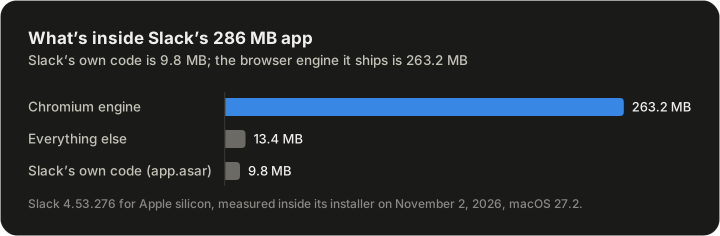
Clearing the cache doesn't touch any of that, and every Electron app carries its own copy of the engine. On an Apple silicon Mac, pick the Apple silicon build: its installer is 116.7 MB, and the universal one is 215.1 MB.
Slack also runs in a browser at app.slack.com, with no app to store. Its system requirements list Safari 26 or later, but huddles work only in Chrome and Firefox. Huddles are one of several things the web version leaves out.
How we measured
- When: November 2, 2026, on a MacBook Air (Mac16,12, M4) running macOS 27.2.
- The app. We mounted Slack's Apple silicon installer (
Slack-4.53.276-macOS.dmg, 116,714,701 bytes) read-only and measured the app with/, without installing or opening it. The universal installer's size is from the server's response headers.usr/ bin/ du -sk - The menu labels and dialog text come from Slack's own code (
app.asar), read as text. The folder paths come from Slack's help pages, unchecked, because Slack isn't installed. - The stand-in's sizes come from the command shown and
/on its folder inusr/ bin/ du -sk ~/.Library/ Caches - Once installed, a copy from the disk image takes about what we measured. An app from the App Store can take less: on our Mac, macOS stored those compressed.