Why Electron apps are so big: each one ships its own Chrome
By Wapp team ·Published
Tested on macOS 27.2 on a MacBook Air (Mac16,12, M4), Slack 4.53.276, Discord 0.0.420, Notion 7.41.1, Signal 8.33.0, Figma 126.11.7, Obsidian 1.14.5, Microsoft Teams 26276.505.5234.9924, and four Electron apps installed on our Mac
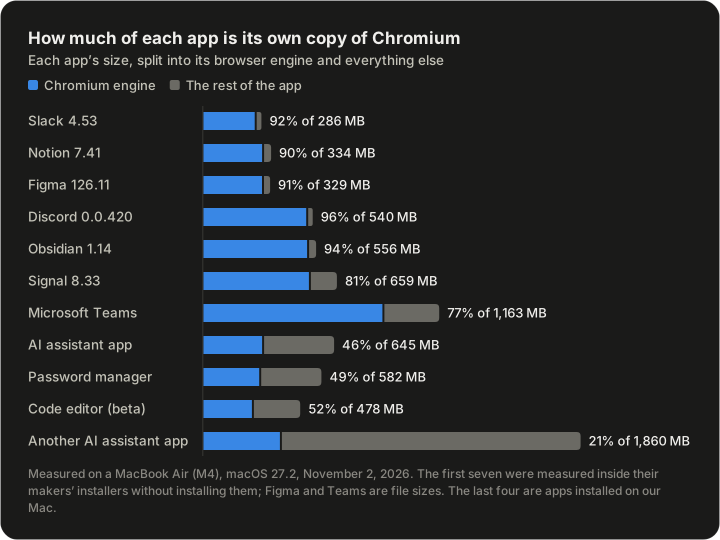
Slack's Mac app is 286 MB, and 263 MB of it is one folder: a copy of Chromium, the open-source core of Google Chrome. In the six Electron apps we measured from their installers, that folder was 81% to 96% of the app.
Electron "embeds Chromium and Node.js", in its own words, so a company can write one app for macOS, Windows and Linux in web code. Each app brings its own browser engine, and your Mac stores every copy.
What we measured
We measured each app inside its maker's installer, without installing it, plus four already installed on our test Mac. "Engine" is the folder that holds Chromium, Electron Framework.framework in most of them. Figma's and Teams' rows are file sizes, the others disk space.
| App | Build | App size | Engine | Engine's share | Chromium |
|---|---|---|---|---|---|
| Slack 4.53.276 | Apple silicon | 286.4 MB | 263.2 MB | 92% | 156.0.8078.49 |
| Notion 7.41.1 | Apple silicon | 334.2 MB | 299.5 MB | 90% | 152.0.7977.167 |
| Figma 126.11.7 | Apple silicon | 329.1 MB | 299.1 MB | 91% | 152.0.7977.169 |
| Discord 0.0.420 | Universal | 539.5 MB | 517.1 MB | 96% | 152.0.7977.167 |
| Obsidian 1.14.5 | Universal | 556.1 MB | 521.7 MB | 94% | 150.0.7871.250 |
| Signal 8.33.0 | Universal | 658.8 MB | 530.4 MB | 81% | 152.0.7977.167 |
| Microsoft Teams 26276.505.5234.9924 | Package | 1,163.0 MB | 892.6 MB | 77% | Edge 154.0.4258.62 |
| An AI assistant app | Installed | 644.9 MB | 299.6 MB | 46% | 152.0.7977.167 |
| A password manager | Installed | 582.2 MB | 285.6 MB | 49% | 148.0.7778.280 |
| A code editor in beta | Installed | 477.7 MB | 249.2 MB | 52% | 152.0.7977.169 |
| Another AI assistant app | Installed | 1,860.0 MB | 387.5 MB | 21% | 156.0.8078.79 |
The installed apps carry more code of their own, so the engine's share is lower. In three of them it's still the biggest single folder. The other AI assistant app's own code, in its app.asar archive, is 674.6 MB.
The same numbers, drawn to scale:
What's inside the engine folder
The AI assistant app's 299.6 MB engine is typical. Most of it is one 202.2 MB program file, built for Apple silicon only. Then come 220 language folders, 51.2 MB together: 55 languages, each also in three gendered forms.
Slack's own code, in app.asar, is 9.8 MB. Its engine is about 27 times that.
The code editor ships one language folder instead of 220, so its engine's resources are 26.6 MB against the AI assistant app's 77.2 MB.
Universal apps carry the engine twice
A universal app holds a program for Intel Macs and one for Apple silicon in the same file. Discord, Signal and Obsidian ship that way, with engines of 517 to 530 MB. The Apple silicon builds of Slack, Notion and Figma come in at 263 to 300 MB.
The installers show it too. Slack's Apple silicon one is 116.7 MB and its universal one 215.1 MB. Notion's are 135.8 MB and 236.9 MB.
Four copies on our Mac, in four versions
The four Electron apps installed on our test Mac hold four copies of Chromium, 1.22 GB together. The password manager's is version 148, the AI assistant app's and the code editor's are 152, and the other AI assistant app's is 156.
Each copy updates only with its own app, and no app can use another's. APFS shares disk space only between a file and a copy made from it, so four downloads stay four copies.
It isn't only Electron. Microsoft Teams carries a "Microsoft Edge Framework", Edge's version of Chromium, inside a helper app: 892.6 MB of its 1,163.0 MB. The other AI assistant app renamed its engine folder, but it contains Electron's code.
What WebKit apps do instead
macOS has its own web engine, WebKit, the one Safari uses. On our Mac, a chat app, a notes app, a launcher and a database client all link to the copy that came with macOS, /, and carry no engine of their own.
That's a trade-off, not a free win. WebKit exists only on Apple's systems, so a company that also ships for Windows needs another engine there. And a page that works in Chrome doesn't always work in Safari.
See it on your own Mac
This read-only command lists the engine folder of every Electron app in Applications, with its size in Finder's units:
du -sh --si /Applications/*.app/Contents/Frameworks/Electron\ Framework.frameworkOn our Mac it printed (app names replaced):
286M	/Applications/<password manager>.app/Contents/Frameworks/Electron Framework.framework
300M	/Applications/<AI assistant app>.app/Contents/Frameworks/Electron Framework.framework
249M	/Applications/<code editor>.app/Contents/Frameworks/Electron Framework.framework
The other AI assistant app is missing because its engine folder has another name.
You can't delete the engine: the app won't start without it. What you can do:
- Pick the Apple silicon download where there is one. Its engine is about half a universal build's.
- Remove apps you rarely open, and use their web version. For Slack, Teams, Discord and Notion, the vendors list what the web versions leave out.
- Look past the app. Its caches and data in
~/are often bigger, and its helper processes take memory.Library
How we measured
- When: November 2, 2026, on a MacBook Air (Mac16,12, M4) running macOS 27.2.
- Installers came from each maker's servers. We mounted each disk image read-only, measured the app and deleted the image. We read Figma's ZIP (
unzip -l) and Teams' package (lsbom) without extracting them. Nothing was installed or opened. - Sizes are disk space from
/, in decimal megabytes as Finder shows them, except Figma's and Teams' file sizes.usr/ bin/ du -sk - Versions come from
Info.plistand the engine's version strings, architectures fromlipo -archs. - Once installed, a copy from a disk image takes about what we measured. An app from the App Store can take less: on our Mac, macOS stored those compressed.