Discord's cache on a Mac: where it is and what to leave alone
By Wapp team ·Published
Tested on macOS 27.2 on a MacBook Air (Mac16,12, M4), Discord 0.0.420 (measured inside its installer)
Discord keeps its cache on a Mac in ~/. That's the one folder Discord's own troubleshooting guide tells you to clear, and Discord builds a new one the next time it opens.
The rest of the discord folder isn't cache. It holds the website data that keeps you signed in, and most of Discord's code, which arrives after you install the app.
Clear the cache
- Quit Discord with ⌘Q, as Discord's macOS guide says, and end any Discord processes left in Activity Monitor.
- In Finder, choose Go ▸ Go to Folder (⇧⌘G), type
~/and press Return.Library/ Application Support/ discord - Drag the
Cachefolder to the Trash. - Open Discord. It downloads what it needs again, so images and servers may load slowly at first.
- Empty the Trash when you're sure Discord works. Until then the space isn't free, and you can drag the folder back.
What else is in the discord folder
Discord is an Electron app (a Chromium browser packaged as an app), so most of its folder follows Chromium's layout. We read the rest from Discord's own startup code.
In ~/ | What it is | Clear it? |
|---|---|---|
Cache | Images and other files Discord downloaded | Yes: Discord's guide names it |
Code Cache, GPUCache | Compiled scripts and graphics data, rebuilt on demand | You can, but they're usually small |
Cookies, Local Storage, IndexedDB | Website data: what a web app keeps to sign you in | No |
A folder named after the version, such as 0.0.420, with modules inside | Discord's own code, downloaded after install | No |
module_data | Data for those modules | No |
For scale, an AI assistant app built on Electron has these Chromium folders on our Mac: Cache 33 MB, Code Cache 5.2 MB, GPUCache 307 kB. Discord's depend on what you've opened.
Leave the rest alone. Deleting it is how Discord's guide has you reinstall the app, and you'd have to sign in again.
The app you download is only a starter
Discord 0.0.420, measured inside its installer, is 539.5 MB on disk, and nearly all of it is browser engine:
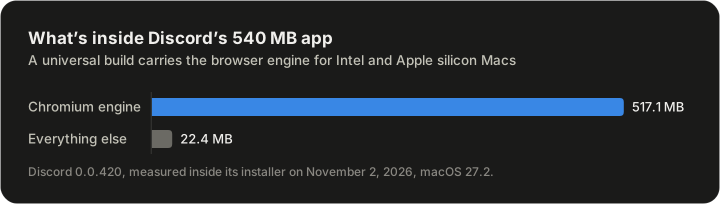
The engine is Electron Framework.framework, Discord's copy of Chromium: 517.1 MB, 96% of the app. It's a universal build, for both Intel and Apple silicon Macs, so its copy is about twice the size of Slack's Apple silicon one. Every Electron app ships its own copy.
Discord's own code, in app.asar, is 3.5 MB. Its package.json calls it "Discord Client for Desktop - Bootstrapper". When it starts, it downloads Discord's real code, in modules such as discord_desktop_core, into the version folder in the table above.
So Discord takes three things on a Mac: the 539.5 MB app, the modules it downloads, and its cache and data. We could measure only the first, because Discord isn't installed on our test Mac. To see the other two on yours, run this read-only command, which prints each folder's size in Finder's units:
du -sh --si ~/Library/Application\ Support/discord/*How we measured
- When: November 2, 2026, on a MacBook Air (Mac16,12, M4) running macOS 27.2.
- The app. We downloaded
Discord.dmg(234,062,073 bytes) fromdiscord.com/, the link in Discord's macOS guide. We measured the app on the read-only disk image withapi/ download?platform=osx /andusr/ bin/ du -sk du -sAk, without installing or opening it. The version is from itsInfo.plist, the architectures fromlipo -archs. - The folder's name and the modules' location come from
package.jsonand the startup code inapp.asar, read as text. Discord's test builds add their channel's name to the folder. - The AI assistant app's sizes come from
du -sh --si. - Once installed, a copy from the disk image takes about what we measured. An app from the App Store can take less: on our Mac, macOS stored those compressed.